Dyes are colors that can be applied to equipped armor and outfits, allowing players to personalize the look of their character. Some items, such as weapons and trinkets cannot be dyed. Mounts, gliders and skiffs can also be dyed. This feature is unlocked account-wide at level 6, with dyes also being available account-wide after unlocking them. A dye will state, in the information panel, if it has already been unlocked. Attempting to unlock the dye again will result in a chat message stating it has been unlocked and the dye will not be consumed.
Up to four different colors may be applied to an individual item, and the outcome may differ depending on the type of material (cloth, leather, metal) that the dye is used on. Although newly acquired items will automatically be dyed with the dyes set for a currently equipped item, once applied, dyes will be saved in the item. For example, a character can equip an item that is not soulbound on use, dye it, put it in the bank and another character that equips the item will see the same colors applied to the item. Dyes will be lost when the item is sold through the Trading Post, though. For outfits, mounts, gliders and skiffs the dyes will be saved in the slot, being carried over when switching skins.
Unlike in the original Guild Wars series, dyes are unlocked, rather than collected as vials. This allows players to change the color of their armor as they see fit, without having to rely on a limited supply and storage.
Acquisition[edit]
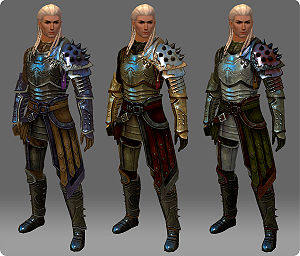
Example of different dye areas
Each account has access to the same set of 21 starter colors. As players progress through the game, additional colors can be acquired in several ways. You can review the colors unlocked for your account via the dye mode in the equipment tab on the hero panel interface.
Standard colors[edit]
Additional 382 dyes can be acquired in the following ways:
- Purchased from the Trading Post.
- Certain dye colors and a generic dye kit can be acquired through the Gem Store:
- Unidentified dyes crafted by chefs:
- These containers are specific to a color category, e.g. Blue or Yellow.
- They come in three types: unlabeled (drops one common color), master (drops a common or uncommon dye), and rare (drops any of the standard colors of that type).
- Unidentified Dye — drops a single dye, with roughly a 65% chance to be common, 25% uncommon, and 10% rare:
- Placing four dyes into the Mystic Forge to create a new dye of the same or higher rarity. Do note that using dyes that haven't been unlocked will not unlock them upon using them in the Mystic Forge.
Exclusive colors[edit]
- See also: Dye/Exclusive colors for a sortable overview excluding already owned colors.
There are also 239 dyes that can be obtained through the Gem Store via dye kits that are generally introduced at the same time as related episodes of the Living World. Alternatively, the individual dyes can be bought on the Trading Post, or a certain selection of account bound versions can be chosen from Birthday Gifts. Each kit contains a single dye randomly selected from a pool of 25 colors: 19 colors are from the standard palette and six are exclusive to that kit, the exceptions being Blue Shift, Shadow, and the combined Flame and Frost dye kits. As with other containers, the chances of each rarity dropping are not equal, e.g. common dyes drop more frequently than uncommon ones, and those drop more often than rares. Kits are only available at the gem store for limited periods of time, usually about 3-4 weeks; after which they are often introduced to the Black Lion Chest as an uncommon drop. Dye kits from the chest have been known to be replaced by newer ones at times.
Dye application[edit]
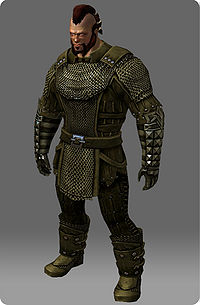
Each piece of this armor is colored using the same dye, but the exact color result is dependent on the material (cloth, leather, or metal) which creates a varied end result.
Players can experiment with many different combinations of dye in order to produce the most desired result. To do this:
- Open the Dyes tab on the Hero panel interface (default key H).
- Select from a range of colors on the left hand side. They will be grouped by set, but can be filtered differently using the sprocket icon above. This view can include dyes not yet unlocked by toggling the Hide/Show Locked option.
- Once a color is selected, apply the dye to one of the panels next to any one of the six armor pieces, back item, glider, or mounts. Any changes will be shown immediately by the character model on the right.
8 colors can be placed into favorites by right-clicking the requested dye. Dyes can be organized by hue, material, and set.
Preview[edit]
The preview window for items has space for up to four colors, which are applied to specific color "channels" on each item. There are four ways to preview specific colors:
- Right-click any dye consumable from inventory or your bank vault.
- Right-click dyes from the Trading Post panel.
- Using the Dye subpanel of the hero window.
- Right-clicking a dye pinged to the chat window; you can do this for dyes you do not own by copying the item codes from dye infobox on the wiki's article and pasting them to any chat channel.
Dyeable items[edit]
Not all items and equipment can be dyed. Dyeable items have up to four dye channels, and any exceptions, such as undyeable parts, are listed under Notes on their respective pages.
- Can be dyed
- Can sometimes be dyed
- Cannot be dyed
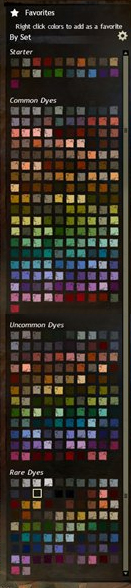
Full set of standard dyes
There are 642 dyes available in the game.
By Material[edit]
- To check already unlocked dyes by material, see: Dye/By Material
- To check already unlocked dyes by set, see: Dye/By Set
By Color[edit]
- To check already unlocked dyes by color, see: Dye/By Color
Dye salvaging[edit]
Since the release of Heart of Thorns, dyes can be salvaged for pigment of their corresponding color. The one exception is that gray dyes yield black pigment or white pigment randomly, with a roughly 50/50 ratio. CFine dyes salvage into 2-4 pigments; DMasterwork 5-8 pigments; and ERare 9-12 pigments. The quality of the salvaging kit does not matter. The pouches of pigments can be used by Scribes and Artificers. Note that salvaging locked dyes will not unlock it, make sure to consume it if you want to unlock its color.
- Pigments
Gallery[edit]
Dye panel from the first Pre-Purchase Weekend Beta Event.
- Attempting to change the dyes on an armor piece while leaving a locked dye color present on that piece (from character selection for example) will prevent the changes from taking effect.
- During the first beta weekend event, players were required to obtain Colorful Dye Seeds that required cultivation back in the "Home" area. Cultivation took either 24 real world hours, or the purchase of an item from the Gem shop. Once cultivated it would drop a soulbound, unidentified dye; that dye would unlock a new color. This system has since been replaced.
- The February 24, 2015 game update added an option to Show/Hide Locked dyes, enabling players to preview their armor dyed with colors they have yet to obtain.


 . Can also drop from Black Lion Chests. Contains 5 common and 2 uncommon dyes.
 .
.


 Pouch of Brown Pigment
 Pouch of Red Pigment
 Pouch of Orange Pigment
 Pouch of Yellow Pigment
 Pouch of Green Pigment
 Pouch of Blue Pigment
 Pouch of Purple Pigment
 Pouch of White Pigment
 Pouch of Black Pigment


.jpg)