Mistfire Wolf
From Guild Wars 2 Wiki
(Redirected from Summon Mistfire Wolf)
Jump to navigationJump to search


“— In-game description


Abilities[edit]
The damage listed below is at level 80 to medium exotic armor (also level 80). The stats of the wolf are not affected by the stats of its summoner.
- Leap - Basic attack. Leaps to target foe. Deals 700-800 base damage. Either inflicts burning or chilled for 1 second.
- Mistfire Storm - Drops 5 mistfire shards around target foe’s location. Each shard deals 600 base damage, chill for 4 seconds and set the targets on fire for 3 seconds (note that the shards strike different locations, which makes it very unlikely that a single target would get hit by all shards).
- Ride the Mistfire - Melee attack. Leaps to target foe, deals 1200 damage and inflicts burning for 1 second.
Acquisition[edit]
- The skill is automatically available to level 31 characters for owners of the Digital Deluxe or Collector's Edition of Guild Wars 2.
Contained in[edit]
-
 Digital Deluxe Upgrade (guaranteed)
Gallery[edit]
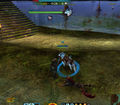
Air Attunement on the Mistfire Wolf
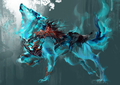
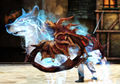


Notes[edit]
- Although the wolf will follow the player underwater, it will not attack any foes while there.
- When unsummoned, the wolf gives life force to nearby necromancers.
- At level 80, the mistfire wolf has 20,000 health.
- The wolf uses its master's condition damage and condition duration.
- The wolf will gain Air Attunement boon after using Ride the Mistfire skill.
- Is available for use when trying the Level 80 Boost in the Silverwastes.
- The wolf disappears when Mount is summoned, and will not reappear upon dismount unless it is summoned again.
Version history[edit]
For a detailed skill history, see here.
| Patch | Changes |
|---|---|
| June 25, 2013 |
|
| September 14, 2012 |
|
| August 28, 2012 | Game release:
|
Trivia[edit]
- Originally, this skill could not be cast while moving.